Why Is Your Amazon Search Suppressed? Causes & Fixes Every India Seller Must Know
Amazon Compliance

Why Is Your Amazon Search Suppressed? Causes & Fixes Every India Seller Must Know

Written by Naveen Kumar Nutheti
9 May, 2026|10 min read
Share

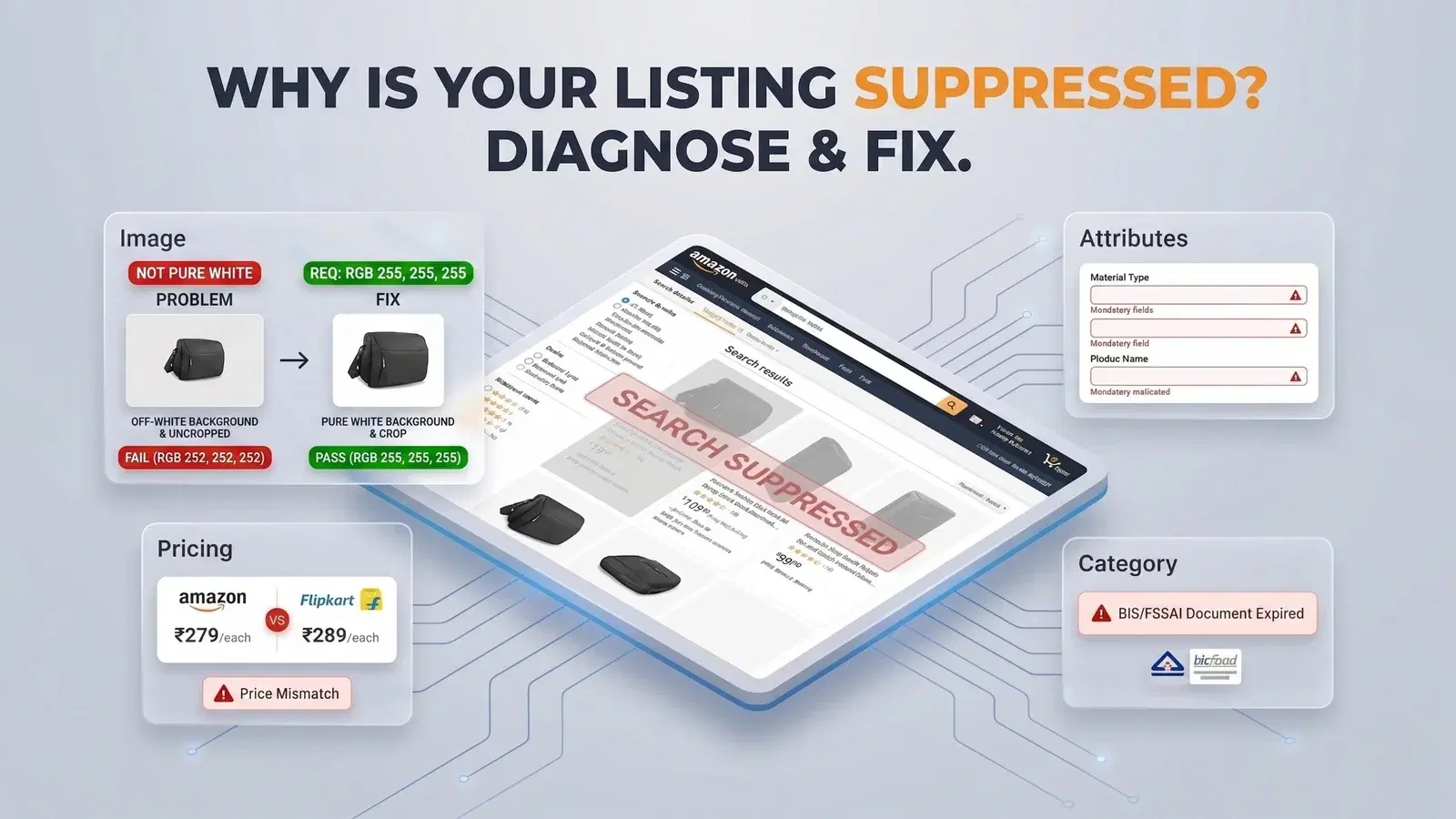
Your listing was live this morning. By afternoon, it had vanished from search. No warning email. No explanation. Just a gap where your product used to be — and zero incoming orders. This guide covers the four main suppression causes on Amazon India, how to find and diagnose them, and the exact steps to resolve each one.

Key Takeaways
Suppression is not deletion. Your ASIN still exists — Amazon has hidden it from search. A targeted fix brings it back.
Images are the #1 trigger. A single off-white background pixel can suppress your listing. RGB must be exactly 255, 255, 255.
Missing attributes mean instant suppression. Brand, size, colour, material type — any empty mandatory field takes the listing down.
Pricing violations happen without warning. Cross-channel price gaps and invalid reference prices both suppress listings, often silently.
Gated categories need specific Indian certifications. FSSAI, BIS, CDSCO — the wrong document is treated the same as no document.
Catch it early. A weekly Catalogue Health audit prevents suppression before Amazon acts.

What Is Amazon ASIN Suppression and Why It Matters

If you have been selling on Amazon India for a while, you already know what an ASIN is. What matters here is understanding what suppression actually does to your listing — and why Amazon's system fires before you even get a notification.
Search Suppression vs. Listing Removal — The Difference That Changes Your Fix
Search suppression means your listing is hidden from buyer search results. The product detail page may still be accessible if someone has the direct URL, but no buyer is going to find it organically. Your Sponsored Ads stop running. The Buy Box goes dark. Sales go to zero.
A removed listing is different — the detail page itself is gone. This is less common and usually tied to a serious policy violation. Most Indian sellers dealing with a sudden visibility drop are dealing with search suppression, not removal — which means the ASIN is intact and a targeted fix will bring it back.
How Amazon India Flags a Listing for Suppression
Amazon runs automated compliance checks across every listing on the platform, continuously. There is no warning system. The algorithm suppresses first and notifies later — and sometimes doesn't notify at all. You find out when you notice your sales have gone quiet.
In 2024, Amazon tightened enforcement significantly, moving from individual ASIN-level action to full account suspensions for sellers with repeated violations. One suppressed listing used to mean one problem. Today, repeated suppression events can escalate to your entire account being reviewed. That is why acting on a suppression the same day you find it is no longer optional — it is a business continuity issue. Every hour offline also degrades your organic search position and Sponsored Ads Quality Score. The listing coming back does not automatically restore your previous ranking; that recovery takes a deliberate relaunch effort.

Top Reasons Your Amazon ASIN Gets Suppressed

Missing or Invalid Product Images
Image issues cause more suppressions on Amazon India than anything else — and the most common mistake is not the product shot itself, it is the background.
Amazon requires your main image to have a pure white background. Not off-white. Not light grey. Not the shade your photographer called clean white. The exact RGB value must be 255, 255, 255. Amazon's compliance bots check this programmatically. If even a cluster of pixels reads 252, 252, 252 due to a shadow at the base of the product, the listing gets suppressed.
The full main image requirements that trigger suppression if violated:
Background: Exact RGB 255, 255, 255 — verify with a colour picker, not by eye
Product coverage: Product must fill at least 85% of the image frame
Resolution: Minimum 1,000px on the longest side; 1,600–2,000px recommended for zoom
Format: JPEG preferred (best quality-to-size ratio and fastest loading); Amazon also accepts PNG, TIFF (.tif), and non-animated GIF (.gif). Maximum file size 10MB
Overlays: No text, logos, watermarks, promotional graphics, or extra props on the main image
One context-specific note on backgrounds: Amazon has increasingly been allowing lifestyle backgrounds in secondary image slots across most categories, and some are now appearing in search thumbnails. If competitors in your category are using lifestyle backgrounds effectively, a clean white background on your main image can actually help your product stand out in the search grid. The choice comes down to what differentiates you in your category — not just what is compliant.
On image dimensions for mobile: Amazon now recommends a portrait aspect ratio (4:5 or 5:6) for product images, alongside the traditional 1:1 square. Over 70% of Amazon India shoppers browse on mobile, and portrait-format images take up more screen space in search results, improving click-through. The core compliance rules do not change — white background, 85% product fill, no overlays on the main image — but adopting portrait ratio early is a competitive advantage worth taking before it becomes standard practice in your category.
Incomplete or Inaccurate Listing Attributes
When Amazon's algorithm detects a missing mandatory field, it suppresses the listing immediately — without asking you to fill it in first. The most commonly absent attributes on Amazon India: brand name, product size, colour, material type, and item weight. These are mandatory in most categories, and their absence alone is enough to take your listing down.
Title length is another trigger that sellers frequently miss. Titles exceeding 200 characters get suppressed — and certain categories have stricter limits: apparel and clothing is typically capped at 125 characters per Amazon's category style guides. The often-cited 80-character figure is Amazon's recommendation for mobile display readability, not a suppression threshold. From January 2025, Amazon began auto-correcting non-compliant titles and suppressing ASINs that violate the updated character limits and special character rules — so titles created before 2025 should be re-checked. Listing a product under the wrong browse node also causes problems, because each category has its own set of mandatory fields. Sellers who move a product to a different node without updating all the relevant attributes often trigger suppression without understanding why.
Pricing Policy Violations
Amazon monitors prices in real time — not just on Amazon India, but across other platforms too. On Amazon India, cross-channel pricing differences do not typically trigger direct listing suppression. What they affect is your Price Competitiveness metric: if your Amazon price is significantly higher than Flipkart, your own website, or other active channels, the listing loses Featured Offer (Buy Box) eligibility — triggering the same cascade: lower sales velocity, weaker ranking, reduced visibility, higher ad spend. Cross-channel price parity is non-negotiable on Amazon India.
A separate trigger that does cause direct suppression: if Amazon's minimum selling price threshold for your ASIN exceeds the minimum price you have set in Seller Central, deal tags get suppressed and the listing may lose Buy Box eligibility until the pricing gap is resolved. The policy also runs in both directions: unusually low prices that fall below your set minimum price can also trigger a Buy Box flag.
Since January 31, 2024, Amazon requires all Lightning Deals and Best Deals to display a validated reference price based on actual sales history. New sellers with no transaction history at the reference price will need to build that history before deal tags become available.
One detail specific to Amazon India that catches sellers off guard: your printed MRP — mandatory under India's Legal Metrology Act — must be consistent with the price entered in Seller Central. If you have recently reprinted packaging with a revised MRP, update the MRP field in your Seller Central listing to match the physical label before the next inventory arrival. This mismatch has caused suppression for several Indian sellers and is an entirely avoidable fix.
Restricted or Prohibited Product Categories
Health and wellness, food and supplements, electronics, baby products, and cosmetics are all gated or semi-gated on Amazon India. Attempting to list without the right documentation triggers automatic suppression — and generic guidance like 'submit your certifications' is not enough. You need to know which specific document Amazon India is asking for in your category.
If Amazon flags your listing for a category restriction, do not just resubmit the listing. Go to Seller Central → Manage Your Compliance and upload the correct documents there. Some categories require invoices dated within the last 365 days alongside the certifications. An expired document is treated the same as no document — Amazon will not tell you which part of your submission failed, so submit everything together and make sure all dates are current.
Poor listing quality is the root cause of most suppressions.

Create a fully optimised, suppression-proof listing in under 2 minutes with EcomBuddha.

Create your listing

How to Find Suppressed ASINs in Your Seller Central

Using the Inventory Dashboard
Go to Seller Central → Inventory → Manage Inventory and look for the Suppressed tab at the top of the listing table. If that tab is not visible, you currently have no suppressed listings. Click the tab and you will see each affected ASIN with an Issue Category column alongside it.
Amazon also has a Fix Your Products menu that surfaces the same information with suggested corrective actions. If you are on FBA, check Manage Inventory → Stranded Inventory separately — suppressed FBA stock appears there with its own reason code and does not always show up in the standard Suppressed tab.
Reading Suppression Reason Codes
The Issue Category is your diagnostic starting point. The five codes you will see most often on Amazon India:
Missing Main Image — image fix required
Missing Attributes — mandatory field fix required
Price Issue — pricing dashboard fix required
Category Restricted — document submission required
Policy Violation — review the violation notice; may require a formal appeal
Occasionally no reason code appears at all. When that happens, run a manual check: Is the word NEW or any condition label in your title? Is there any text or graphic on your main image? Is the ASIN listed under the correct browse node? Any of these can trigger suppression without a visible code in Seller Central.
Bulk Download for Large Catalogues
If you are managing 50 or more SKUs, go to Seller Central → Reports → Inventory Reports and download the Inventory Quality Report. This exports every suppressed ASIN with its reason code into a CSV, which you can sort by issue type and fix in batches. For sellers with even larger catalogues, manually running this report every week becomes its own workload.

Step-by-Step Guide to Fix Amazon Search Suppressed Listings

Fixing Image-Related Suppression
Check the background RGB value. Open the image in Photoshop and use the eyedropper tool on the background area. The reading must be exactly 255, 255, 255. Pay close attention to the shadow area at the base of the product — that is where off-white pixels most commonly hide.
Verify product coverage. The product must fill at least 85% of the frame. No props, no text, no watermarks, no lifestyle elements on the main image.
Check file specifications. JPEG format, minimum 1,000px on the longest side (shoot for 1,600–2,000px), maximum 10MB.
Re-upload and wait. Go to Manage Inventory → Edit → Images tab, upload the corrected image, and save. Amazon typically processes image updates within 24–48 hours. For 10 or more ASINs with the same issue, use the Listing Loader flat file to update images in bulk rather than editing each listing individually.
Correcting Listing Attributes
For a single listing: Manage Inventory → Edit → fill in the flagged fields → save. For 10 or more ASINs with the same missing attribute, download the category-specific flat file inventory template from Seller Central → Add Products via Upload, fill in the missing fields, and upload the file. Attribute edits typically reflect in search within 1–3 business days.
Fields to prioritise: brand name, all five bullet points, product description, size, colour, and material type. If the suppression is due to a title that is too long, count the characters before resubmitting — the limit is 200 characters for most categories and 80 for clothing and accessories.
Resolving Pricing Violations
Open your Pricing Dashboard in Seller Central and check the competitive price threshold. If your current price exceeds it, bring it within range. If the issue is a missing reference price, set a List Price that reflects your actual sales history — Amazon validates it against real transaction data. Amazon validates reference prices against your actual sales history for the ASIN before approving strikethrough pricing.
Check your prices on Flipkart, Meesho, and your own website. Amazon must not be priced higher than any other active channel. If your printed MRP has changed with a new packaging run, update the MRP field in Seller Central to match the physical label — that mismatch is a known suppression trigger on Amazon India.
When to Open a Seller Support Case
Escalate to Seller Support in these situations:
The suppression reason code is blank or does not match your listing's actual state
Category documents were uploaded but the listing is still suppressed after 72 hours
You believe it is an incorrect flag — this happens regularly in health, cosmetics, and electronics
A pricing fix was applied but the Buy Box has not returned after 3 business days
Include in your case: the ASIN, the issue category code, every corrective step you have already taken with dates, and supporting documents. Be specific — vague case descriptions get copy-paste responses.
If Seller Support loops you with generic replies after two rounds, escalate to the Amazon Performance Team via Account Health → Contact Us. Write two to three sentences covering what the problem is, what you have already done, and what you are asking for. Include your existing case number. This reaches a different team and typically gets a substantive response within 48 hours.

How Long Does Reinstatement Take?

One thing sellers consistently underestimate: the ranking impact does not reverse the moment your listing comes back. Your organic search position and Sponsored Ads Quality Score both degrade during suppression. Plan a short relaunch push — typically a 5–7 day Sponsored Products campaign at competitive bids — immediately after reinstatement to recover lost ground faster than organic recovery alone would allow.
How to Track Reinstatement Status
After applying your fix, return to Manage Inventory → Suppressed tab. When your listing disappears from that view, it is live again. Amazon also sends a notification to your registered email — check your spam folder too, because these occasionally land there rather than your inbox.
Once you get the confirmation, do not just trust the email. Search your product keywords directly on Amazon.in and confirm the ASIN is appearing in results and the Buy Box is active. Only then reactivate any paused ad campaigns — launching ads on a listing that is still processing can waste budget on impressions that do not convert.

How to Prevent Future ASIN Suppression on Amazon India

Run a Weekly Listing Quality Audit
Amazon's Listing Quality Dashboard in Seller Central flags compliance warnings before they escalate into live suppressions. Set a recurring calendar reminder — 15 minutes on Monday morning — to check it and clear any open warnings. A warning you fix today takes 10 minutes. A suppression you find on Friday afternoon costs you the entire weekend's sales and ranking.
Build a Change Review Checkpoint Into Your Workflow
Catalogue changes are the most common source of repeat suppression. Adding new variants, redesigning packaging (which changes dimensions, weight, or MRP), updating titles, adjusting pricing across channels — any of these can create a compliance gap if you do not review the listing immediately after the change.
Build a simple checkpoint into your process for any catalogue change: verify that images still meet RGB and resolution specs, all mandatory attributes are populated for the current browse node, and your Amazon India price is not higher than any other active channel. This takes 5 minutes and prevents a problem that can take 3 days to fix after the fact. Amazon updated its image compliance bots in ongoing enforcement updates mean images that cleared a year ago may not clear today, so re-audit your main images at least once per quarter.
Follow Amazon India Policy Updates Before They Hit Your Listings
Amazon India updates category requirements, certification lists, and pricing policies on a rolling basis — and the notifications are easy to miss. The January 2025 product title policy update is a clear example: from January 21, 2025, Amazon began auto-correcting non-compliant titles and suppressing ASINs that violated the 200-character limit and special character rules. Sellers who missed the announcement only found out when their listings disappeared from search or their titles were changed without their input — by then, the ranking impact had already begun.
Check the Announcements section in Seller Central every two weeks. For high-volume categories like electronics, health, and food, join the relevant seller forums on Seller Central where Amazon sometimes posts clarifications before they appear in the main announcement feed. Knowing about a policy change two weeks before enforcement begins is the difference between a smooth update and a surprise suppression.
See your listing score before it becomes a suppression.

Pick any ASIN, run the Listing Score check, and get a detailed analysis and fixes for your listing — in one view.

Run a free check

Conclusion

Most cases of amazon search suppressed status on Amazon India are preventable — and the ones that do happen are almost always fixable in under 72 hours if you catch them early and apply the right fix.
The pattern that separates sellers who recover fast from those who spend weeks in Seller Support loops: they do not wait to be suppressed. They run regular product listing on amazon health checks, they keep their catalogue clean after every update, and they treat compliance as part of their weekly routine rather than something to deal with when sales drop.
Whether you have just had your first suppression or you are dealing with a recurring problem across a large catalogue, the fix starts with knowing which of the four causes applies to you — and then executing the right steps, in the right order.

Frequently asked Questions

Naveen Kumar Nutheti

Naveen Kumar Nutheti is a seasoned e-commerce strategist with 12+ years of experience across India and the Middle East. He has scaled businesses past ₹1,000 Cr in annual revenue and consults brands including Godrej, Nippon Paint, Kohler, Havells, Taparia, and Birla Opus on e-commerce sales strategy and product listing optimisation. He is the founder of EcomBuddha, an AI-powered listing intelligence platform for Amazon India sellers.

© Digicom Buddha Tech pvt ltd. All rights reservedPrivacy PolicyTerms of Service